Something slowing your business down?

Let's Figure it out!

Enhance Inventory Accuracy with DynamIQ’s Barcode Integration

DynamIQ Barcode is a third-party inventory integration designed to extend SAP Business One with barcode-driven tracking and scanning capabilities. Built for businesses that require speed, accuracy, and traceability, it supports both batch-managed and serial-managed items across industries such as food and beverage, pharmaceuticals, and electronics.

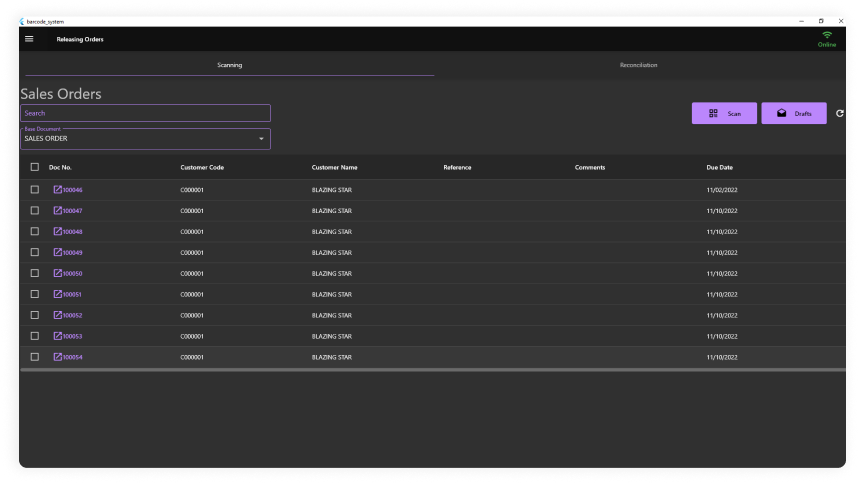
IQ Barcode software displayed on a monitor
IQ Barcode product overview
IQ Barcode

Product Overview

IQ Barcode is a robust barcode inventory solution seamlessly integrated with SAP Business One. It enhances your logistics workflow enabling fast, accurate tracking items through barcode scanning-bringing efficiency, reliability, and real time visibility to your operations.

Technical Specifications

Supported SAP Business One Versions

IQ Barcode is designed for SAP Business One environments and connects to SAP B1 through the SAP B1 Service Layer REST API.

The system is intended for on-premise SAP Business One deployments and can also support SAP B1 Cloud environments when a Service Layer endpoint is available.

Deployment

IQ Barcode is deployed on-premise and connects directly to the SAP B1 Service Layer hosted on the customer’s server.

For SAP B1 Cloud compatibility, IQ Barcode requires HTTPS connectivity from the IQ Barcode client device to the SAP Service Layer URL.

This allows the Windows desktop and Android mobile clients to communicate with SAP Business One through the Service Layer endpoint.

Cloud Compatibility

IQ Barcode is compatible with SAP B1 Cloud through the SAP Service Layer endpoint.

The client device must be able to connect securely to the SAP Service Layer URL through HTTPS.

Supported Barcode Formats

IQ Barcode supports both 1D and 2D barcode formats for scanning and label printing.

Barcode TypeSupported Formats
1D BarcodesCode 128 using ^BC ZPL, Code 39 using ^BA ZPL, and EAN-13
2D BarcodesQR Code using ^BQ ZPL and Data Matrix
Camera ScanningQR Code, Code 128, and EAN-13 through the mobile_scanner library

Supported SAP B1 Transactions

IQ Barcode supports key SAP Business One inventory, sales, purchasing, warehouse, and fixed asset transactions.

SAP TransactionIQ Barcode Module
Goods Receipt PO, Document Type 20Goods Receipt PO
Delivery, Document Type 15Delivery Receipt
Sales Order, Document Type 17Sales Order Scanning & Reconciliation
AR Invoice, Document Type 13AR Invoice via Delivery flow
Inventory Transfer, Document Type 67Inventory Transfer
Inventory Transfer Request, Document Type 1250000001Inventory Transfer Request
Goods Receipt, Document Type 59Goods Receipt, Inventory
Goods Issue, Document Type 60Goods Issue, Inventory
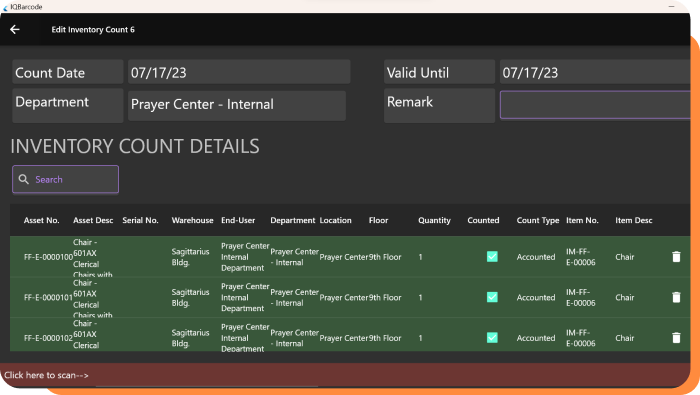
Inventory CountingInventory Counting
Stock Transfer / Bin TransferBin Transfer
Fixed Asset Master DataAsset Count, Enrollment, and Retirement

Feature List

Barcode Scanning

IQ Barcode supports scanning through hardware barcode scanners and camera-based scanning on supported mobile devices.

Hardware scanners can include any USB or Bluetooth HID barcode scanner operating in keyboard-wedge mode.

Camera scanning supports QR Code, Code 128, and EAN-13 through the mobile_scanner library.

GS1 Compliance

IQ Barcode supports GS1-compliant barcodes.

The system reads the raw barcode value and matches it against SAP item barcodes. GS1 Application Identifiers can also be parsed as needed depending on the client’s barcode requirements.

Label Output

IQ Barcode supports label output through ZPL, or Zebra Programming Language.

This enables direct printing to Zebra thermal printers for barcode labels and related warehouse or inventory labels.

SAP B1 Transaction Scanning

IQ Barcode supports scanning workflows for SAP Business One transactions such as Goods Receipt PO, Delivery Receipt, Sales Order Scanning & Reconciliation, AR Invoice via Delivery flow, Inventory Transfer, Inventory Transfer Request, Goods Receipt, Goods Issue, Inventory Counting, Bin Transfer, and Fixed Asset Master Data workflows.

This allows warehouse, inventory, sales, purchasing, and asset-related teams to process SAP B1 transactions through barcode-enabled workflows.

License Structure

IQ Barcode uses a per-company license structure with named user seats.

SAP TransactionIQ Barcode Module
ModelPer company license with named user seats.
User SeatsEach SAP B1 user who logs into IQ Barcode requires a separate license.
Multi-CompanyEach SAP B1 company database requires a separate license.
Platform IncludedThe license covers both Windows desktop and Android mobile clients.
UpdatesSoftware updates are included during the active subscription period.

Pricing

IQ Barcode uses a subscription-based annual pricing model.

Pricing is custom-quoted based on:

  • Number of concurrent users
  • Modules required
  • Client-specific customizations
Pricing

This allows pricing to be aligned with the client’s SAP B1 environment, required barcode workflows, and implementation scope.

Implementation Timeline

The typical IQ Barcode implementation timeline is 2 to 4 weeks.

Actual implementation duration may vary depending on the number of SAP B1 company databases, required modules, barcode formats, label requirements, device setup, user roles, and client-specific customizations.

Implementation Timeline

Frequently Asked Questions (FAQ)

How does this module impact warehouse and inventory accuracy?

By scanning items at every stage of the logistics process—receiving, picking, packing, and dispatch—the system ensures real-time updates to your inventory in SAP B1. This greatly minimizes errors and improves inventory visibility and control.

Is the module compatible with all barcode scanners?

The DynamIQ Barcoding Module supports a wide range of industry-standard barcode scanners. We recommend models that are SAP-certified or Android-based for optimal compatibility and performance. Specific device recommendations are available upon request.

Can it support batch or serial number tracking?

Yes. The module supports both batch-managed and serial number-managed items, making it ideal for industries requiring traceability such as food & beverage, pharmaceuticals, and electronics.

Does the module work in real time?

Yes. Barcode scan data is processed and pushed in real time to SAP Business One, ensuring your inventory levels and warehouse status are always up to date.

Can the module handle multiple warehouses or storage locations?

Absolutely. The DynamIQ Barcoding Module supports multi-warehouse and bin location management, allowing you to track stock movements across different locations with precision.

Does the module require internet connectivity to function?

For real-time syncing with SAP B1, a stable connection is required. However, some offline functionality can be configured depending on the scanner used, with data synced once connectivity is restored.

How long does it take to implement the DynamIQ Barcoding Module, and what does that process involve?

Implementation time varies depending on the size of your warehouse, the number of users, and the complexity of your inventory processes. It includes a system assessment, configuration aligned with your SAP Business One setup, hardware compatibility checks, barcode mapping, user training, and live testing.

What kind of post-implementation support is available?

We offer comprehensive support including software updates, technical troubleshooting, and user assistance. Custom enhancements can also be discussed based on evolving operational needs.

We'd like to hear from you

Tell us about your business and we will show you how SAP Business One and the IQ Suite can streamline your operations, compliance and growth.

+63 917-630-4848